An applicant tracking system (ATS) reads your CV before any recruiter does, and it does not care how the page looks. It turns your document into text, hunts for headings and keywords, and scores what it finds. If your format scrambles that reading, a strong candidate can be filtered out on a technicality. The format that reliably survives is boring on purpose: one column, plain structure, standard labels.
This isn’t a fringe concern. In Jobscan’s 2024 analysis, 98.4% of Fortune 500 companies — 492 of 500 — used a detectable ATS, a figure that has held above 97% for years. For most real jobs the parser is the first reader, and a CV it can’t read is a CV a human never sees.
Why layout, not content, is what fails
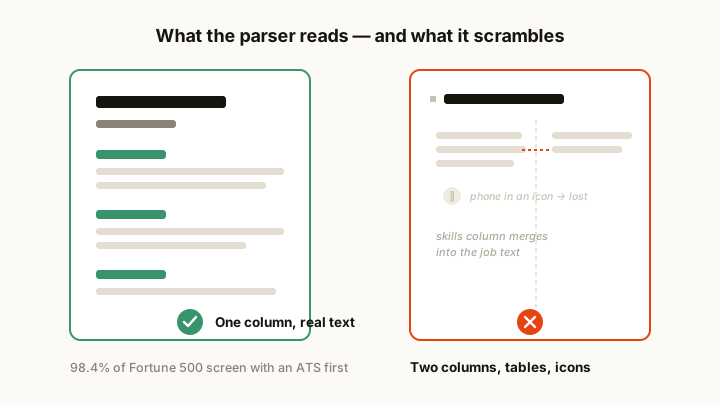
The reason good candidates get filtered is almost never the substance of their experience — it’s the container. Two-column designs, sidebars, headers-and-footers, tables, and text boxes are the usual culprits. A parser reading left-to-right can merge your skills column into the middle of a job description, or drop it entirely. Icons and images carry no text, so a phone number saved as a graphic simply vanishes. Put a critical detail in the document header and some systems never read it at all.
Picture a clean-looking two-column CV: skills run down a left sidebar, experience fills the right. To you it’s organised. To a parser reading straight across, the first line can become “Python · Led the migration of” — your skill list and your job bullets fused into nonsense. The fix is structural, not cosmetic:
- One column, top to bottom: the only reading order a parser cannot misinterpret.
- Real text, never images: contact details and headings must be selectable text, not graphics.
- Standard section names: Work Experience, Education, Skills, spelled plainly — not “Where I’ve Made an Impact.”
- No tables or text boxes: put dates and titles in normal lines instead.
- Nothing critical in the header/footer: keep your name and contact details in the body.
- A common font and a PDF export with selectable text — unless the listing asks for
.docx.
Feed it the keywords it is looking for
Passing the parse is step one. The system also matches your text against the job description and scores the overlap, so mirror the exact terms the advert uses. If it says “stakeholder management,” use that phrase, not a synonym like “managing relationships.” If it names a specific tool, name that tool. You’re not gaming the system — you’re speaking its language so a genuine match registers as one.
Two rules keep this honest and effective: only claim skills you actually have, and never stuff keywords in white text or a hidden layer. Modern systems flag it, and recruiters see through it instantly — it’s the kind of trick that gets a real candidate binned.
Confirm it before you trust it
You cannot eyeball whether a CV parses. A layout that looks flawless to you can still collapse the moment the software reads it, and you’ll never know unless you check. The only reliable test is to see the extracted text yourself — the plain-text version the ATS actually scores — and fix whatever comes back garbled or missing.
A 30-second pre-send check
- Copy-paste your CV into a plain-text editor. If the order scrambles or the columns interleave, the ATS will read it that way too.
- Confirm your name, phone, and email survive as plain text.
- Check that every section heading is a standard, plainly-named one.
- Match your keywords against the specific job description, not a generic list.
Run your draft through the ATS checker to see exactly what the software reads, and the resume keyword scanner to match it against a specific listing. The ATS-friendly templates start you from a safe format, the guide to reading your ATS score explains what the numbers mean, and the CV format and design guide covers the wider layout choices that keep a CV readable to humans and parsers alike.