Formatting is where good content quietly wins or loses. The same experience, laid out two ways, reads as “senior and organised” or “junior and cluttered” — and long before a human decides, a parser has to make sense of it too. This guide covers the decisions that matter: length, file format, fonts, margins and whitespace, colour, and layout. The through-line is simple: the choices that make a CV readable to a person are the same ones that make it readable to software.
How long should a CV be?
The honest answer is “as long as it needs to be, and no longer” — but there are real conventions:
- One page for students, early-career candidates, and most applications with under ~10 years of experience. If you’re cutting to fit, cut the oldest and least relevant first.
- Two pages once you have the track record to justify it. A second page is fine when every line earns its place; it’s a problem when it’s padding.
- Longer only for specific documents — academic CVs, which follow their own rules (see the academic CV guide), or senior records where completeness matters.
The failure mode isn’t length, it’s filler. If a CV runs two pages because of a fifteen-year-old job and an objective statement, it’s not too long — it’s carrying dead weight. When a CV genuinely spans multiple pages, number them and repeat your name on each; see handling multi-page CV page numbering.
File format: what to actually send
Two rules cover almost every case:
- Send a PDF unless told otherwise. A PDF preserves your layout on every device; a
.docxcan reflow, repaginate, or shift fonts on someone else’s machine. Export cleanly so the text stays selectable — never a flattened image of your CV, which no parser can read. - Send
.docxwhen the employer or ATS explicitly asks. Some older systems parse Word more reliably. When in doubt, follow the instructions in the posting.
Whatever the format, the file has to survive the applicant tracking system’s first read. That’s a topic of its own — see a CV format that passes ATS.
Fonts and sizes
Typography should be invisible. The reader should notice your achievements, not your font choice.
- Use one clean, common typeface. Serif (Georgia, Cambria) or sans-serif (Calibri, Helvetica, Arial) both work — pick one and use it throughout. Avoid decorative or condensed fonts; they cost readability and can confuse parsers.
- Body text 10–12pt, headings 12–16pt. Below 10pt you’re sacrificing legibility to cram; above 12pt for body reads as padding.
- Limit yourself to one font family, using weight (bold) and size for hierarchy rather than a second typeface.
Margins and whitespace
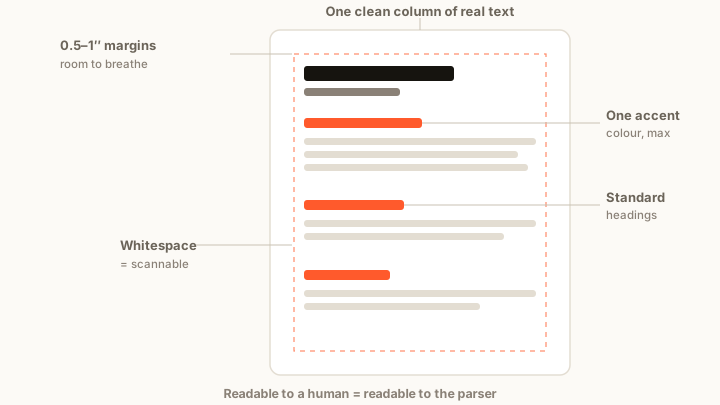
Whitespace isn’t wasted space — it’s what makes a page scannable. In the seven seconds a recruiter spends, a cramped wall of text buries the very lines you want seen.
- Margins of 0.5–1 inch on all sides. Half an inch is the practical floor; tighter and it looks squeezed and can clip on print.
- Space between sections so the eye can find the boundaries. Consistent spacing reads as care; erratic spacing reads as haste.
- Don’t fight the page by shrinking margins and font to force one page. If it won’t fit cleanly, cut content instead.
Colour and visual hierarchy
A little colour, used with discipline, helps. A lot of it hurts.
- One accent colour, maximum, for section headings or a name — ideally a deep, professional tone. Everything else stays black or dark grey on white.
- Contrast matters for both people and parsers: keep body text high-contrast; light-grey text to look “modern” just makes it harder to read.
- Match the field. A minimalist, restrained design suits most corporate, legal, and technical roles; more expressive layouts belong to creative fields where the CV is part of the portfolio.
Layout: where things go
Layout is about guiding the eye down the page in the order you want it read.
- One clear column of real text. Two-column layouts can look elegant but often confuse parsers, which may read straight across and scramble your content. If you use columns, test that the file still parses in order.
- Standard section order — contact, summary (optional), experience, education, skills — so both human and software find things where they expect them.
- Reverse-chronological within experience, most recent first, because that’s what gets read closest.
- Consistency over cleverness. Same bullet style, same date format, same heading treatment throughout. Small inconsistencies read as carelessness.
Format for specific situations
Some contexts have their own conventions worth getting right:
- Executive CVs balance length with impact and lead with scope and results — see the executive CV format.
- Legal and other regulated fields follow stricter formatting norms — see legal CV formatting for law firms.
- References have their own placement rules — see how to format references on a CV.
The point
Good formatting is invisible: it gets out of the way so a busy reader — and the software in front of them — finds your best work fast. Pick one clean font, give the page room to breathe, use colour sparingly, keep the layout parser-safe, and let length follow content rather than the other way round. When you’re ready, Kazifi’s CV maker applies these defaults automatically and the ATS checker confirms the result parses cleanly before you send it.