A three-page CV rarely reaches a committee as three stapled pages. It gets printed, dropped, photocopied, and reassembled by a coordinator handling dozens of files. Page numbering and a running header are the small mechanics that ensure a stray sheet still finds its way back to your application.
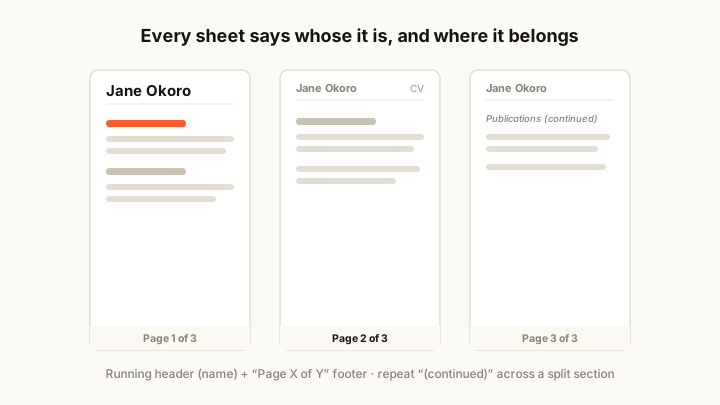
Number every page, and say how many there are
The safest format is “Page X of Y”, placed in the footer. A lone “2” tells a reader nothing if page 3 has gone missing, but “Page 2 of 3” makes the gap obvious. This matters most for academic and senior CVs that legitimately run long (see the academic CV guide for where those pages come from).
- Running header: your full name on every page except, optionally, the first.
- Footer number: “Page X of Y” aligned consistently, usually centred or right.
- First page: often skips the header since your name already headers the document.
Keep sections from breaking badly
A page break in the middle of a single job entry or a split publication citation looks accidental. Use your editor’s “keep with next” or “keep lines together” setting so a heading never sits alone at the foot of a page, and an entry does not tear across the fold.
Where a section genuinely must span pages, repeat the section heading with “(continued)” at the top of the new page. A reader who turns to page two mid-publication-list should not have to flip back to learn what they are looking at.
Check it in the format it will be read
Numbering that looks right on screen can drift once exported. Always generate the final PDF and scroll through it, because auto-fields sometimes recalculate and reflow. Print one copy if the role involves a physical panel; on-screen previews hide how the pages actually fall.
A quick final pass: confirm every page carries your name, the footer count is right on all sheets, no heading is stranded at a page foot, and no single entry tears across the fold. Two minutes here prevents the one impression you can’t fix — a CV that arrives looking mishandled.
Getting this right is easier when the tool manages it for you. The CV maker applies consistent headers and footers across pages automatically, and our templates are built to break cleanly between sections. If your document is running long, the CV format and design guide helps you decide whether all those pages are earning their place, and the one-page templates are there if you conclude they are not.