A single CV that tries to fit every role fits none of them well. The moment you’re applying in two directions — say, individual-contributor and management, or two different industries — one document forces a compromise that weakens both. The fix isn’t a folder full of near-identical files. It’s a deliberate, small system.
Start with a master CV
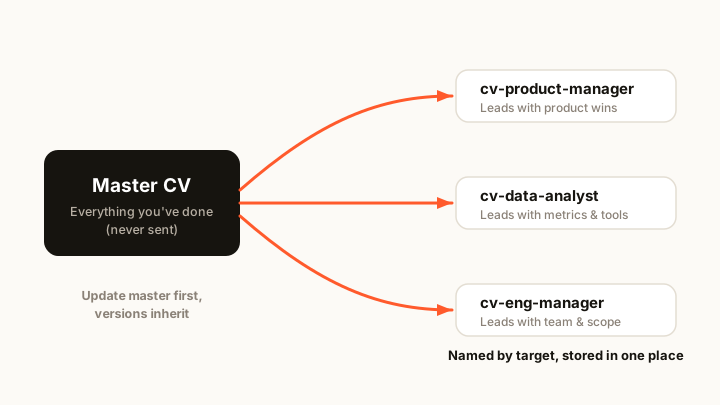
Your master CV is the long-form record of everything you’ve done: every role, result, tool, grant, and number. You never send it. It’s the library every tailored version is cut from. Because it holds everything, you’re never reconstructing your history under deadline — you’re just selecting from it.
Keep the master honest and specific. When you learn something new about a target — a phrase a job description keeps using, a result that lands well in interviews — update the master first, then let the tailored versions inherit it.
Cut two or three tailored versions
From the master, cut a version for each direction you’re genuinely pursuing. Two or three, not ten. Each one:
- Leads with the achievements that matter for that direction. A management version foregrounds team size, hiring, and outcomes; an IC version foregrounds what you built and shipped.
- Uses that field’s language and keywords, so it clears the applicant tracking system’s first screen. (More on that in a CV format that passes ATS.)
- Drops what’s irrelevant to that target, so the seven-second scan lands on the right things — see what recruiters see in 7 seconds.
Resist making a brand-new version for every single application. Small edits to the closest existing version are usually enough; a genuinely new direction is what earns a new version.
Name and store them so you never guess
Version chaos looks like CV_final_v3_REAL.docx times seven and no memory of which one you sent where. Two rules prevent it:
- Name by target, not by date.
cv-product-managerandcv-data-analysttell you what a file is.cv-jan-final-v2tells you nothing in three weeks. - Keep them in one place. Not scattered across your desktop, downloads, and three email drafts. One home means one source of truth.
It also helps to keep a lightweight log — which version went to which employer and when — so a callback six weeks later doesn’t leave you guessing what they actually read.
Keep them in sync
The hidden cost of multiple versions is drift: you fix a typo or add a win to one file and forget the other four. Over months, your versions quietly disagree — different dates, different titles, a result on one but not another. A recruiter who cross-checks against your LinkedIn sees the inconsistency you planted.
Sync deliberately: master first, then propagate. Every real change goes into the master, and each tailored version is regenerated from it rather than hand-edited in isolation. That single habit is what keeps a multi-version system from becoming a liability.
When to fold versions back
More versions isn’t better. If you haven’t applied with a version in months, or two versions have drifted to near-identical, fold them back into the master and delete the copy. A tight set of two or three current, distinct versions beats a graveyard of stale ones — the same reason a lean, current CV beats a pile of overlapping drafts (see how to keep your CV updated).
The point
Managing multiple CVs is a system, not a folder: one honest master, a few genuinely distinct tailored versions, named by target, stored together, and synced master-first. Do that and applying to the next role — in whichever direction — is a confident five-minute edit.
When you’re ready, Kazifi’s CV maker keeps your master profile and every tailored version in one place and in sync, and the ATS checker scores each version against the job before you send it.